Ground Station
“Ground station” is everything in Lyrebird that runs off the aircraft and talks to it — as opposed to the Android App, which runs on the RC itself. This page covers the two pieces of it that ship in this repo: the Python DJIInterface client, and the MediaMTX/browser dashboard used for multi-drone video and telemetry testing. The ROS 2 packages are the third piece of the ground station and get their own page — see ROS 2.
Every ground station, regardless of language, reaches the aircraft over the same two wires the Android App exposes: MAVLink 2 and HTTP + TCP, both on by default. The Python client is where that choice is most visible, so it’s worth understanding before looking at the client itself.
Do you need a ground station at all?
Section titled “Do you need a ground station at all?”Not necessarily. Everything on this page is optional tooling built on top of the same two wires the app already exposes directly — it is not an intermediary a custom application has to go through. A robotics application can talk MAVLink or HTTP straight to the aircraft itself, exactly the way it would talk to a real PX4 vehicle or a bare HTTP API: read telemetry, send MAV_CMDs or POST /send/... calls, no ground-station process sitting in between. See MAVLink 2 or HTTP API to do that directly.
The two pieces of this repo earn their keep for two specific, different reasons rather than as a required relay layer:
- The Python client and the ROS 2 packages are mainly valuable today as a local translator: they turn the aircraft’s MAVLink or HTTP surface into a ROS 2 graph, which matters if the application flying the drone is already built around ROS 2 — a planner, a SLAM stack, multi-robot coordination — and would otherwise have to speak MAVLink/HTTP itself just to get into ROS. If the application isn’t ROS-based, it gains nothing by going through this layer; it should talk MAVLink or HTTP to the aircraft directly instead, the same way this ROS 2 node itself does.
- MediaMTX and the video dashboard solve a fan-out and protocol-translation problem for video specifically — see Why MediaMTX? below. Watching or consuming video directly from the phone, with no MediaMTX involved, is also a legitimate option.
What runs where
Section titled “What runs where”Everything on the aircraft side lives in the app on the RC; the ground station is whatever you choose to run on your computer. Only two of those pieces need Docker:
| What | Runs on | Needs Docker? |
|---|---|---|
MAVLink — QGroundControl, MAVSDK, pymavlink, lyrebird-mavlink-listen | your computer, talking straight to the app | No |
| HTTP API (port 8080) and TCP telemetry (port 8081) | served by the app; call them with curl, Python, anything | No |
Python client — DJIInterface, the FTP client, the test scripts | plain Python on your computer | No |
| ROS 2 nodes | a ROS 2 environment | Yes — GroundStation/run_docker.sh — or a local ROS 2 install |
| Video dashboard, MediaMTX | the Docker Compose stack in GroundStation/video_test/ | Yes |
So flying from QGroundControl — take-off, go-to, missions, gimbal, recording — needs no Docker at all. Live video is the exception: QGroundControl and the browser both watch the stream through MediaMTX, and the dashboard stack is what starts MediaMTX and tells the aircraft to publish to it. Run the stack whenever you want video, in QGroundControl or in the browser.
The two Docker setups overlap in one place. The dashboard stack’s ros-monitor container also starts the ROS controller nodes by default (ROS_RUN_CONTROLLER=1), so with the dashboard running, ROS nodes are already connected to every discovered drone. Don’t start run_docker.sh on top of it, or each drone gets two sets of controllers — or start the dashboard with ROS_RUN_CONTROLLER=0 if you only want video and will run ROS separately.
Flight examples
Section titled “Flight examples”GroundStation/examples/ flies the same short flight — take off, fly 15 m north at 10 m, return
home — through each way of talking to the aircraft, so you can start from the one that matches your
stack. Each checks the aircraft before it flies, does nothing without --fly, and sends the
aircraft home on Ctrl+C, a timeout or a refusal. The folder’s README.md walks through installing,
a dry run and the first flight.
| Script | Interface | Start from it when |
|---|---|---|
http_raw.py | HTTP + the TCP telemetry stream, nothing else imported | writing a client in another language |
python_client.py | DJIInterface (any LB_TRANSPORT) | you want the shortest Python |
mavlink_pymavlink.py | raw MAVLink 2 — the commands QGroundControl sends | debugging, or another MAVLink tool |
mavlink_mavsdk.py | MAVSDK (mavsdk-grpc) | autonomy software built on MAVSDK |
ros2_flight.py | ROS 2, lyrebird_controller topics | a ROS 2 stack |
All five have been flown with a DJI Mini 4 Pro.
Choosing a transport
Section titled “Choosing a transport”The DJIInterface class (and everything built on it — the ROS nodes, the safety wrapper, the video dashboard) reads one environment variable, LB_TRANSPORT, to decide which wire to use. It can also be passed explicitly as transport= to the constructor, which is what a test or a script pinning a specific behavior should do instead of relying on the environment.
LB_TRANSPORT | Telemetry from | Commands | When to use it |
|---|---|---|---|
both (default) | MAVLink | MAVLink where it has an equivalent, HTTP where it doesn’t | The normal choice: MAVLink is the lighter wire, so it carries as much as it can, and HTTP transparently fills the gaps (media download, settings the MAVLink surface doesn’t expose yet). See why HTTP still exists. |
mavlink | MAVLink | MAVLink only — an endpoint with no MAVLink form is refused, not silently retried over HTTP | Verifying MAVLink parity itself: a silent HTTP fallback would hide exactly the gap you’re trying to measure. |
http | TCP telemetry stream | HTTP | Talking to an aircraft with MAVLink disabled, or a ground station that predates MAVLink support entirely (WildBridge-era compatibility). |
Two related environment variables matter once MAVLink is in play:
| Variable | Default | Meaning |
|---|---|---|
LB_MAVLINK_PORT | 14550 | UDP port this ground station listens on. The fleet ROS manager uses one shared value for all aircraft; give a second ground station on the same machine (QGroundControl, say) a different port, or the two compete for the same datagrams. |
LB_MAVLINK_PEER_PORT | 14550 | UDP port the aircraft listens on for commands. Only needs to differ from LB_MAVLINK_PORT when this ground station’s own listen port has been moved. |
LB_MAVLINK_SIGNING_KEY | (unset) | 64 hex characters. When set, every outbound command is MAVLink-2-signed with it, so the aircraft treats this ground station as the Safety Computer — the MAVLink equivalent of the HTTP X-Safety-Token header. |
Python interface (DJIInterface)
Section titled “Python interface (DJIInterface)”GroundStation/Python/lyrebird_groundstation/dji_client.py provides one class that wraps every command, every telemetry field, and both wires behind the same API — a script written against DJIInterface doesn’t change when the transport underneath it does. It runs its telemetry reader (TCP, MAVLink, or both) on a background thread and hands back thread-safe snapshots, so a caller reading telemetry never blocks on the network and never sees a half-written update.
Installing it as a package, in another repo
Section titled “Installing it as a package, in another repo”GroundStation/Python is a real pip-installable package (pyproject.toml, distribution name lyrebird-groundstation) — it does not need to be vendored (copy-pasted) into a consuming project. Install it straight from this repo, pinned to a commit or tag:
uv add "git+https://github.com/SDU-UAS-Center/lyrebird.git@<commit-or-tag>#subdirectory=GroundStation/Python"(or pip install with the same URL — it is a normal distribution, uv simply records it in your lockfile)
or as a requirements.txt / pyproject.toml dependency line:
lyrebird-groundstation @ git+https://github.com/SDU-UAS-Center/lyrebird.git@<commit-or-tag>#subdirectory=GroundStation/PythonKeeping it up to date is then just bumping <commit-or-tag> and reinstalling — no manual re-diffing of a vendored copy. The ROS 2 packages (ROS 2) are a separate concern: they’re normal ROS 2 (ament_python/ament_cmake) packages, not pip packages, so pull them into a colcon workspace the ROS way — a vcstool .repos file pinned the same way, imported with vcs import src < lyrebird.repos, instead of a bind-mounted or hand-copied directory.
A few things are worth knowing before reaching for it:
- Auto-discovery finds the aircraft’s IP over UDP broadcast (port 30000) when none is given, so a script doesn’t need to hardcode it.
- Sequence-tracked commands: a navigation call like
requestSendGoToWaypointNoseForwardreturns a sequence number, andisWaypointReached(seq)only reports arrival for that command — so polling for arrival can’t be fooled by a stale “reached” flag left over from a previous, superseded command. - The two-computer safety wrapper lives in
lyrebird_groundstation.safetyasDJIInterfaceSafety, a drop-in subclass that authenticates every command as the Safety Computer instead of the Pilot. See the safety model for what that authority actually does.
With that in mind, here is the same client exercising most of the surface:
import timefrom lyrebird_groundstation.dji_client import DJIInterface, discover_drone
# Auto-discovery via UDP broadcast (port 30000) if no IP provideddji = DJIInterface("", discover_callback=discover_drone)
# Start background telemetry thread (TCP socket, port 8081)dji.startTelemetryStream()
# Read latest telemetry (thread-safe, returns copy of last JSON snapshot)print(dji.getBatteryLevel())          # int: 0–100print(dji.getLocation())              # {'latitude': ..., 'longitude': ..., 'altitude': ...}print(dji.getHeading())               # float: compass degreesprint(dji.getAttitude())              # {'pitch': ..., 'roll': ..., 'yaw': ...}print(dji.getGimbalAttitude())        # {'pitch': ..., 'roll': ..., 'yaw': ...}print(dji.getSatelliteCount())        # intprint(dji.getFlightMode())            # str: 'GPS', 'ATTI', 'VIRTUAL_STICK', 'GO_HOME', ...print(dji.isManualOverrideActive())   # boolprint(dji.getRemainingFlightTime())   # int: secondsprint(dji.getDistanceToHome())        # float: metresprint(dji.getZoomRatio())             # float
# Commandsdji.requestSendTakeOff()dji.requestSendLand()dji.requestSendRTH()                  # Aborts mission first, then RTHdji.requestSendEnableVirtualStick()dji.requestAbortMission()             # Abort + disable Virtual Stickdji.requestAbortDJINativeMission()    # Abort DJI native mission only
# Navigation# Nose-forward: drone turns to face the leg, flies forward, then rotates to yaw on arrival.dji.requestSendGoToWaypointNoseForward(49.306254, 4.593728, 20.0, yaw=90, speed=5.0)# Hold-heading: nose stays on yaw for the whole flight (drone crabs sideways), tighter tolerance.dji.requestSendGoToWaypointHoldHeading(49.306254, 4.593728, 20.0, yaw=90, speed=5.0)dji.requestSendNavigateTrajectoryDJINative(    [(49.306, 4.593, 20), (49.307, 4.594, 25), (49.308, 4.595, 20)], speed=10.0)dji.requestSendGotoYaw(45.0)dji.requestSendGotoAltitude(30.0)
# Camera / gimbaldji.requestSendGimbalPitch(-30.0)dji.requestSendGimbalYaw(45.0)dji.requestSendGimbalRelPitch(-5.0)     # relative to the current angledji.requestSendGimbalRelYaw(10.0)dji.requestSendZoomRatio(4.0)dji.requestCameraStartRecording()dji.requestCameraStopRecording()
# Thermal / payloaddji.requestCapture()                     # capture descriptor for the thermal lensdji.requestCaptureTemperature()          # thermal max temperaturedji.requestLRFMeasure()                  # distance + geo-referenced target + laser statedji.getLRFTarget()                       # last locked target from telemetrydji.requestDrop()                        # release payload (airframes with a drop port)
# Mediafiles = dji.listMedia()                  # [{"name", "index", "size", "type"}, ...]dji.downloadByName(files[0]["name"], out_dir="./media")
# Sequence-tracked commands — avoids acting on a stale reach flagseq = dji.requestSendGoToWaypointNoseForward(49.306254, 4.593728, 20.0, yaw=90, speed=5.0)while not dji.isWaypointReached(seq):    time.sleep(0.1)
# Preflightdji.isReadyToTakeoff()dji.getTakeoffBlockReason()
# Manual overridedji.requestDeactivateManualOverride()
# RTH altitudedji.requestSetRTHAltitude(50.0)
# Virtual stick (raw AVS, values saturated to ±0.3 by DJIInterface)dji.requestSendStick(leftX=0, leftY=0.2, rightX=0.1, rightY=0)
dji.stopTelemetryStream()
The two-computer safety wrapper lives in lyrebird_groundstation.safety — see HTTP API.
Why MediaMTX?
Section titled “Why MediaMTX?”The app always has a video feed available directly, with no ground station involved: DJI’s SDK runs an always-on RTSP server on the phone itself, pulled by anything that connects to rtsp://<phone-ip>:8554/streaming/live/1 — no in-app configuration needed. lyrebird_videofeed, the ROS 2 video node covered on the ROS 2 page, is a working example of exactly that: it connects straight to the phone’s own RTSP stream and republishes it as a ROS topic, no MediaMTX in the path at all.
MediaMTX earns its place for two problems that direct connection doesn’t solve:
- Fan-out. DJI’s RTSP server (and the app’s WHIP publish target) is built to serve a small number of direct connections well, not an arbitrary number of viewers. Every extra client connecting straight to the phone adds encode/network load on the phone, on the same Wi-Fi link the flight controller depends on. Point the aircraft at MediaMTX once — one WHIP publish — and any number of WHEP subscribers watch the relay instead, without the phone or the network even knowing there is more than one viewer.
- Protocol translation. The app publishes one way in (WHIP); MediaMTX serves it back out however the consumer wants it — WHEP for a browser, RTSP or RTMP for something that only speaks those — without the app needing to support every protocol every consumer might want.
Both are conveniences, not requirements: connecting straight to the phone works whether that means pulling DJI’s native RTSP stream as above, or a custom application pushing WHIP directly and consuming it itself with no relay in between.
The WHIP path is also, underneath, a workaround for DJI’s own streaming being slow — not DJI tooling itself. RTSP push, RTMP, Agora, GB28181, and the always-on RTSP pull server all run through DJI’s own internal live-streaming implementation end to end: the SDK owns the encode, the mux, and the network transport, and none of that is something this app controls or can speed up — that internal pipeline is what the up-to-10-second latency actually comes from, on every one of those paths, not anything specific to RTSP as a protocol.
WHIP sidesteps that pipeline entirely instead of asking DJI to send it faster. DJIV5VideoCapturer pulls raw decoded YUV frames straight off ICameraStreamManager.addFrameListener — the same low-level live-view frame callback DJI’s own preview SurfaceView uses, not the streaming/broadcast API RTSP-push and friends are built on — and hands each frame directly to Lyrebird’s own WebRTC stack (WhipPublisher, using Google’s libwebrtc), which does its own H.264 encoding and its own network transport over RTP straight to MediaMTX. None of DJI’s streaming code runs in this path at all.
That is also exactly why latency stays low and bounded rather than creeping up: RTP is a real-time transport with no muxed-container buffering to accumulate delay in, and AdaptiveFrameRatePolicy actively watches for the encoder or network falling behind and steps the frame rate down (30 → 25 → 20 → … → 5 fps) to relieve it, rather than letting frames queue up. The tradeoff from field testing is exactly that: usually under a second end to end, at the cost of occasionally dropping to a lower frame rate instead of the several-second creep RTSP/RTMP/Agora/GB28181 all show.
The optional surface-H264 encoder
Section titled “The optional surface-H264 encoder”WHIP has two encoder choices on the Android side. The transport and relay are the same in both cases; only the path that produces H264 changes:
| WHIP encoder | Camera-to-encoder path | Best for |
|---|---|---|
| Standard WebRTC encoder (default) | DJI addFrameListener -> raw NV21/YUV -> Lyrebird crop/scale -> libwebrtc H264 | The reliable fallback, phone-side detection, and devices where surface encoding is untested |
| DJI surface H264 (experimental) | DJI putCameraStreamSurface -> MediaCodec COLOR_FormatSurface -> hardware H264 -> WebRTC EncodedImage | Reducing CPU-side pixel conversion and keeping the camera path closer to native resolution |
The experimental choice is controlled by the Android preference lb_whip_surface_h264_encoder and by the Surface H264 toggle in the app’s Stream / WebRTC settings. It is false by default in a fresh installation and requires an app restart after changing. It is an encoder switch, not a different public URL: the publish endpoint remains http://<ground-station-ip>:8889/<drone_name>/whip, and viewers still use the matching WHEP endpoint.
The surface path creates an Android MediaCodec H264 encoder input surface and hands that surface to DJI’s camera stream manager. DJI writes camera frames directly into the encoder surface, so the app avoids the normal CPU NV21 conversion, crop, and scale work. The compressed output is drained asynchronously and passed into WebRTC as EncodedImage; a small synthetic WebRTC driver supplies cadence calls because the real pixels arrive asynchronously through MediaCodec rather than through onFrameCaptured.
Several details make the handoff usable rather than merely fast:
- SPS/PPS codec configuration is retained and prepended to keyframes so a new MediaMTX/WHEP decoder can initialise correctly.
- MediaCodec output bytes are copied before the codec buffer is released. The handoff is zero-copy on the camera-to-encoder input path, but not on the compressed output path.
- Presentation timestamps from MediaCodec are carried into WebRTC capture timestamps.
- A bounded output queue detects pressure. When it overflows, dependent delta frames are discarded, a sync frame is requested, and delivery resumes from the next keyframe instead of continuing with a broken H264 reference chain.
- Surface-source metrics are forwarded into the same dashboard telemetry as the standard path, including FPS, bitrate, quality limitation, unsent encoded frames, and recovery count.
This addresses the prototype failure modes: dropping compressed delta frames caused blur and jumps until a decoder reference was refreshed, holding MediaCodec buffers produced black video, and waiting for a conventional first capturer frame could stall startup. The surface path avoids those specific problems, but remains experimental because MediaCodec behaviour and DJI surface/listener coexistence need validation on each aircraft and Android controller. If a device produces black video, stalls, or shows repeated recovery, disable the preference and restart to return to the standard libwebrtc encoder.
GroundStation video dashboard
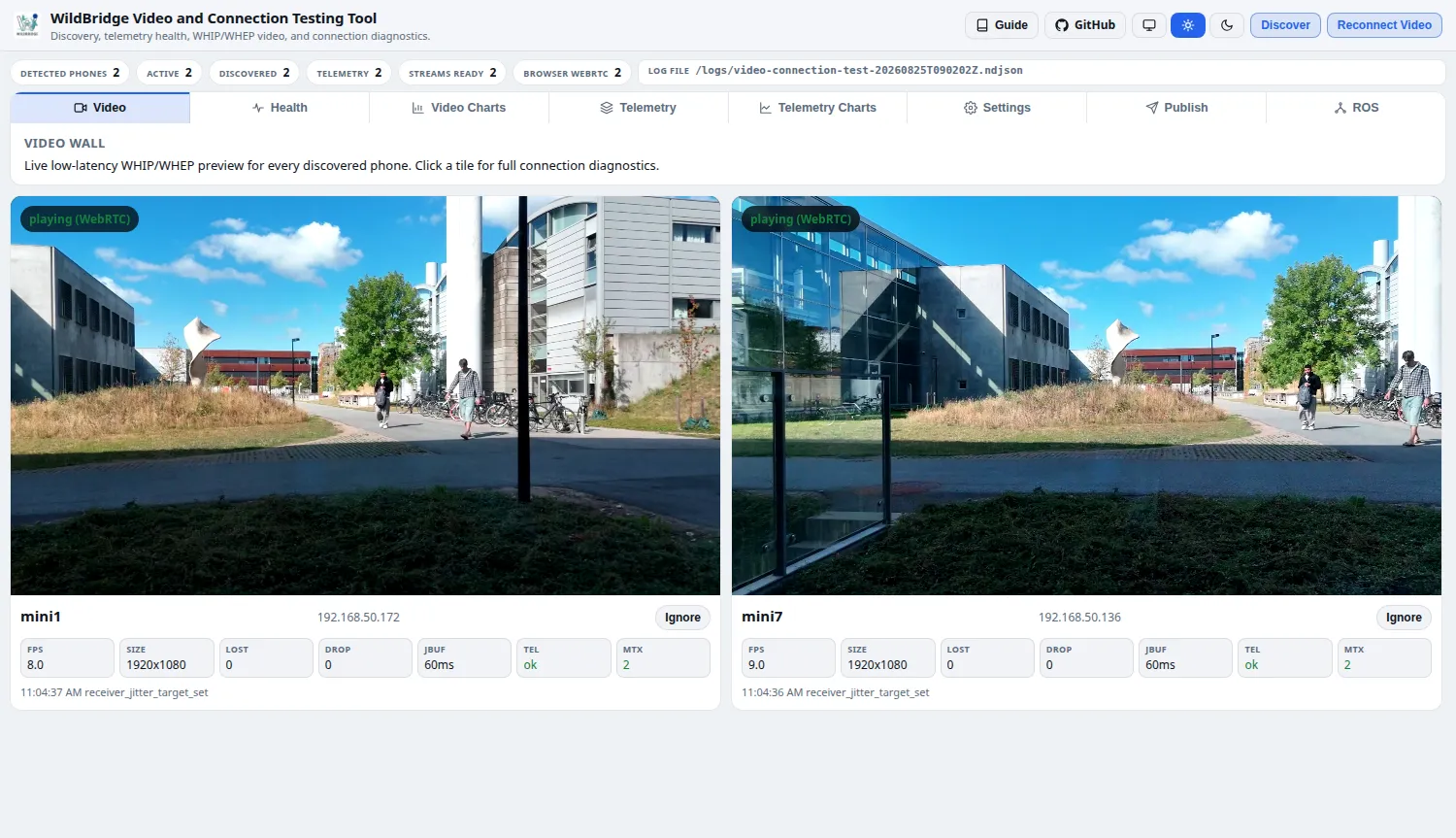
Section titled “GroundStation video dashboard”Flying more than one aircraft at once raises a question a single Python script doesn’t answer well: is every drone’s video actually healthy, and if one isn’t, is the problem the phone, the network, MediaMTX, or the browser watching it? The video dashboard exists to answer that at a glance across a whole fleet, rather than one drone at a time from the command line. Under the hood it’s the same building blocks as everything else on this page — MediaMTX for WHIP/WHEP video, and the TCP telemetry stream (or MAVLink) for state — packaged as a Docker stack with a browser front end: it discovers phones on the network automatically, connects to each one’s telemetry, tracks stream health continuously, and plays every feed back through WHEP.
What the stack starts
Section titled “What the stack starts”GroundStation/video_test/compose.yaml starts three containers, all on the host network so the aircraft can reach them directly:
| Container | What it does |
|---|---|
lyrebird_mediamtx | The video relay. Each aircraft publishes its stream here over WHIP; MediaMTX serves it back as WHEP to browsers and as RTSP to QGroundControl. |
lyrebird_video_grid | The dashboard at http://localhost:8090. It finds aircraft on the network, connects to their telemetry — which is what makes an aircraft start publishing video to this computer — and shows every tab below. It follows a drone being renamed in the app on its own. |
lyrebird_ros_monitor | The ROS tab’s data, and by default the ROS controller nodes for every discovered drone (see What runs where). |
Start, check, stop
Section titled “Start, check, stop”From the repository root:
docker compose -f GroundStation/video_test/compose.yaml up -d --builddocker compose -f GroundStation/video_test/compose.yaml psThe first start builds the images and takes a few minutes; later starts are quick. --build also rebuilds after you pull new code, so keep it. ps should show all three containers running and the two with health checks (video_grid, ros_monitor) as healthy. Then open http://localhost:8090: with the RC on the same network and the app running, the drone appears within a few seconds and its video tile starts playing.
docker compose -f GroundStation/video_test/compose.yaml logs -f video-grid # follow one servicedocker compose -f GroundStation/video_test/compose.yaml down # stop everythingRuntime diagnostics are also written under GroundStation/video_test/logs/, which git ignores.
Settings
Section titled “Settings”Set these as environment variables in front of the up command, for example ROS_RUN_CONTROLLER=0 docker compose -f GroundStation/video_test/compose.yaml up -d:
| Variable | Default | Meaning |
|---|---|---|
ROS_RUN_CONTROLLER | 1 | Start the ROS controller nodes for discovered drones. 0 for video and dashboard only |
DRONE_NAMES | (empty) | Comma-separated names to show; empty shows every drone discovered. Listed names are fixed and don’t follow a rename in the app |
DRONE_FALLBACKS | (empty) | name=ip pairs, comma-separated, for drones that discovery can’t reach |
VIDEO_GRID_PORT | 8090 | Dashboard port |
LB_WEBAPP_MAVLINK_PORT | 14552 | Port the dashboard’s MAVLink tab listens on — kept off QGroundControl’s 14550 |
Ports in use:
| Service | Default URL / Port |
|---|---|
| Browser dashboard | http://localhost:8090 |
| MediaMTX WebRTC / WHIP / WHEP | http://localhost:8889 |
| MediaMTX API | http://localhost:9997 |
| MediaMTX RTSP | rtsp://localhost:8554 |
| ICE UDP | :8189 |
Settings can be viewed and changed for each drone from the Settings tab: it reads and writes DJI flight limits (RTH altitude, max height/distance), RC pairing and stick mode, and app/video settings over HTTP, and shows read-only rows for the drone name, the detected aircraft model, and the control profile (speed/PID/gimbal profile) automatically selected for it — so you can confirm the right profile is active without opening the app on the phone.
| Tab | What it shows |
|---|---|
| Video | Live WHIP/WHEP tiles per drone with quick FPS/loss/telemetry stats |
| Health | Correlated phone/sender/MediaMTX/browser diagnostics, worst symptom first |
| Video Charts | Decoded FPS, bitrate, packet loss, and jitter over time |
| Telemetry | Full nested live state tree per drone |
| Telemetry Charts | Battery, satellites, altitude, and Wi-Fi RSSI over time |
| Settings | View and change DJI/app settings per drone over HTTP |
| HTTP | The full /send/ catalogue, each entry marked if it also has a MAVLink form |
| MAVLink | What the aircraft reports and accepts as a MAVLink 2 vehicle, with an HTTP cross-check |
| ROS | Per-drone ROS topic liveness and rates from ros-monitor |
Next steps
Section titled “Next steps”- Browse every command and status endpoint: HTTP API.
- Fly a complete example flight from your own code: Flight examples.
- Fly from QGroundControl or MAVSDK instead: MAVLink 2.
- Feed a ROS 2 graph from the same aircraft: ROS 2.
- See what runs on the aircraft side of this connection: Android App.
- Verify all of this against a real aircraft: Field Test.