HTTP API
All commands are HTTP POST requests to port 8080 under /send/…. Status is read through HTTP GET endpoints and the TCP telemetry stream.
HTTP runs alongside MAVLink 2, on by default. It’s kept for compatibility with ground stations built against this project’s predecessor, WildBridge; it covers what MAVLink doesn’t yet (AI detections, live settings); and it’s the fast path for big transfers — HTTP uses as much of the Wi-Fi link as it can, which is what media and video need, where MAVLink FTP stays deliberately slow and lightweight so it doesn’t crowd the radio spectrum a swarm shares.
Two-Computer Safety Authority
Section titled “Two-Computer Safety Authority”Two computers can drive the same drone over HTTP. Which one is in command is decided purely by the
X-Safety-Token header on each request:
| Request | Classified as |
|---|---|
carries the valid X-Safety-Token | Safety Computer |
| anything else (no header, wrong token) | Pilot Computer |
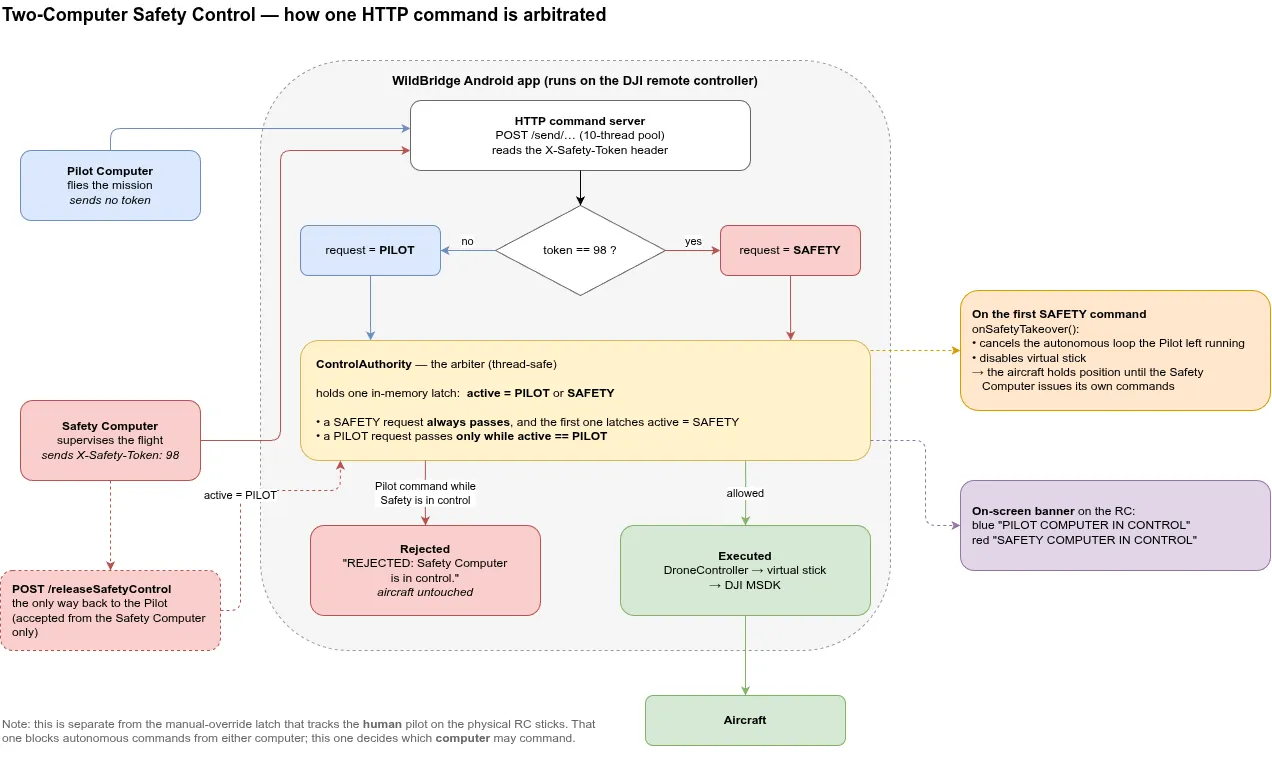
How a single HTTP command is arbitrated: the X-Safety-Token header classifies the request, ControlAuthority holds a latch (kept between runs, keyed by aircraft serial), and the first Safety command seizes control and cancels whatever the Pilot was flying.
Rules enforced by the app on every /send/* command:
- The Pilot Computer holds control at startup and flies the mission normally.
- The first command from the Safety Computer latches authority to SAFETY, cancels whatever autonomous loop the Pilot left running, and holds the aircraft in place.
- From then on every Pilot command is rejected with
REJECTED: Safety Computer is in control. Pilot commands are blocked. - The takeover is persistent — there is no timeout. If the Safety Computer goes silent, the Pilot does not regain control.
- The only way back is
POST /releaseSafetyControl, which only the Safety Computer may call. - The latch survives a restart, and is keyed by aircraft serial. A crash, an OOM kill, or an Android-initiated restart is not the Safety Computer releasing control, so the app reads the latch back on startup — the red banner is shown before an aircraft has even connected. A takeover only ever holds the airframe it happened on: connecting a different aircraft reads that aircraft’s latch, so one airframe cannot lock out another.
- The latch lives in the app’s private preferences. Clearing app data or reinstalling the app is the deliberate bypass when the Safety Computer is not there to release it; nothing else clears it, and the app will not do it for you.
While the Safety Computer holds authority, a red SAFETY COMPUTER IN CONTROL banner is shown over the video feed. Normal Pilot control shows no banner.
This axis is independent of the RC manual-override latch: that one tracks the physical pilot on the sticks, this one tracks which computer commands the server.
from lyrebird_groundstation.safety import DJIInterfaceSafety
safety = DJIInterfaceSafety("192.168.1.100") # every command carries the tokensafety.requestSendGotoAltitude(30.0) # first command seizes controlsafety.requestReleaseSafetyControl() # hand authority back to the Pilot| Method & Endpoint | Body | Description |
|---|---|---|
POST/releaseSafetyControl | — | Return authority to the Pilot Computer (Safety Computer only) |
Control Endpoints (HTTP POST — Port 8080)
Section titled “Control Endpoints (HTTP POST — Port 8080)”| Method & Endpoint | Body | Description |
|---|---|---|
POST/send/takeoff | — | Takeoff |
POST/send/land | — | Land |
POST/send/RTH | — | Return to home (aborts active mission + disables VS first) |
POST/send/enableVirtualStick | — | Enable Virtual Stick mode |
POST/send/abortMission | — | Stop mission + disable Virtual Stick |
POST/send/abortAll | — | Stop all active missions (DJI native + Virtual Stick) |
POST/send/abort/DJIMission | — | Stop DJI native mission only |
POST/send/stick | leftX,leftY,rightX,rightY | Direct AVS velocity input (values ∈ [-1, 1]) |
POST/send/gotoWaypointNoseForward | lat,lon,alt,yaw[,speed] | Turn to face the leg, fly forward, rotate to yaw on arrival (yaw = final heading) |
POST/send/gotoWaypointHoldHeading | lat,lon,alt,yaw[,speed] | Hold yaw for the whole flight (drone crabs sideways), tighter arrival tolerance |
POST/send/navigateTrajectoryDJINative | speed;lat,lon,alt;… | DJI native KMZ mission (≥ 2 waypoints) |
POST/send/gotoYaw | yaw_degrees | Rotate to heading |
POST/send/gimbal/rel_pitch | roll,pitch,yaw | Gimbal pitch relative to current angle (degrees) |
POST/send/gimbal/rel_yaw | roll,pitch,yaw | Gimbal yaw relative to current angle (degrees) |
POST/send/capture | — | Take one photo on the aircraft’s camera, whichever lens it is. Returns {"captured":true,"file":"<name>"} once the file is on the SD card, or {"error":"Failed to capture photo"} |
POST/send/captureThermalImage | — | Capture on the thermal lens. Returns a JSON capture descriptor |
POST/send/captureTemperature | — | Read the thermal max temperature. Returns {"thermalMaxTemp": <float or null>} |
POST/send/listMedia | — | List every file on the SD card as JSON |
POST/send/downloadMediaByName | <fileName> | Download one media file by name; responds with the raw file bytes |
POST/send/lrf/measure | — | Fire the laser rangefinder. Returns distance, geo-referenced target, and laser state as JSON. distance and target are non-null only when the laser locks (state NORMAL, needs a GPS fix) |
POST/send/drop | — | Release the payload on airframes with a drop port configured in the active profile; rejected otherwise |
POST/send/gotoAltitude | altitude_m | Change altitude |
POST/send/gimbal/pitch | roll,pitch,yaw | Set gimbal pitch |
POST/send/gimbal/yaw | roll,pitch,yaw | Set gimbal yaw joint angle |
POST/send/camera/zoom | zoom_ratio | Set camera zoom |
POST/send/camera/startRecording | — | Start recording |
POST/send/camera/stopRecording | — | Stop recording |
POST/send/setRTHAltitude | altitude_m | Set RTH altitude |
POST/send/deactivateManualOverride | — | Re-enable autonomous commands after pilot override |
POST/send/autoSensing/start | — | Enable DJI AutoSensing object detection where supported |
POST/send/autoSensing/stop | — | Disable DJI AutoSensing object detection |
Status Endpoints (HTTP GET — Port 8080)
Section titled “Status Endpoints (HTTP GET — Port 8080)”| Method & Endpoint | Returns | Description |
|---|---|---|
GET/config | JSON | Drone name, IP, HTTP/telemetry ports, whether telemetry is actually answering, and current video mode |
GET/get/isManualOverrideActive | JSON/text | Manual override state |
GET/get/autoSensing/status | JSON | AI detection status and target count |
GET/get/autoSensing/targets | JSON | Current detected targets with bounding boxes |
All other flight state data is available via the TCP telemetry stream on port 8081. Use
GET /configfor connection metadata and auto-discovery.